
How to Turn Your Smash or Pass Votes Into a Tier List
Smash or Pass is a yes-or-no game. Every character gets one answer, which makes voting fast, but it hides how strongly you feel. Your biggest Smash and your most reluctant Smash look exactly the same in the vote count.
A tier list fixes that. In every Smash Senpai game, your votes can be turned into a four-tier image that you can rearrange, name, download and share. This guide covers how it works, from your first vote to the finished image.
What a Smash or Pass tier list shows
Your list has four tiers: Hard Smash for the characters you feel strongest about, Smash, Pass, and Hard Pass for the ones you want nowhere near your list. Characters you smashed start in Smash, characters you passed start in Pass, and the two hard tiers hold the extremes.
The finished image carries the game's name, how many characters you smashed and passed, and a badge with your smash rate, which is your smashes divided by your total votes. In the example below, 14 smashes out of 27 votes comes to 52%.
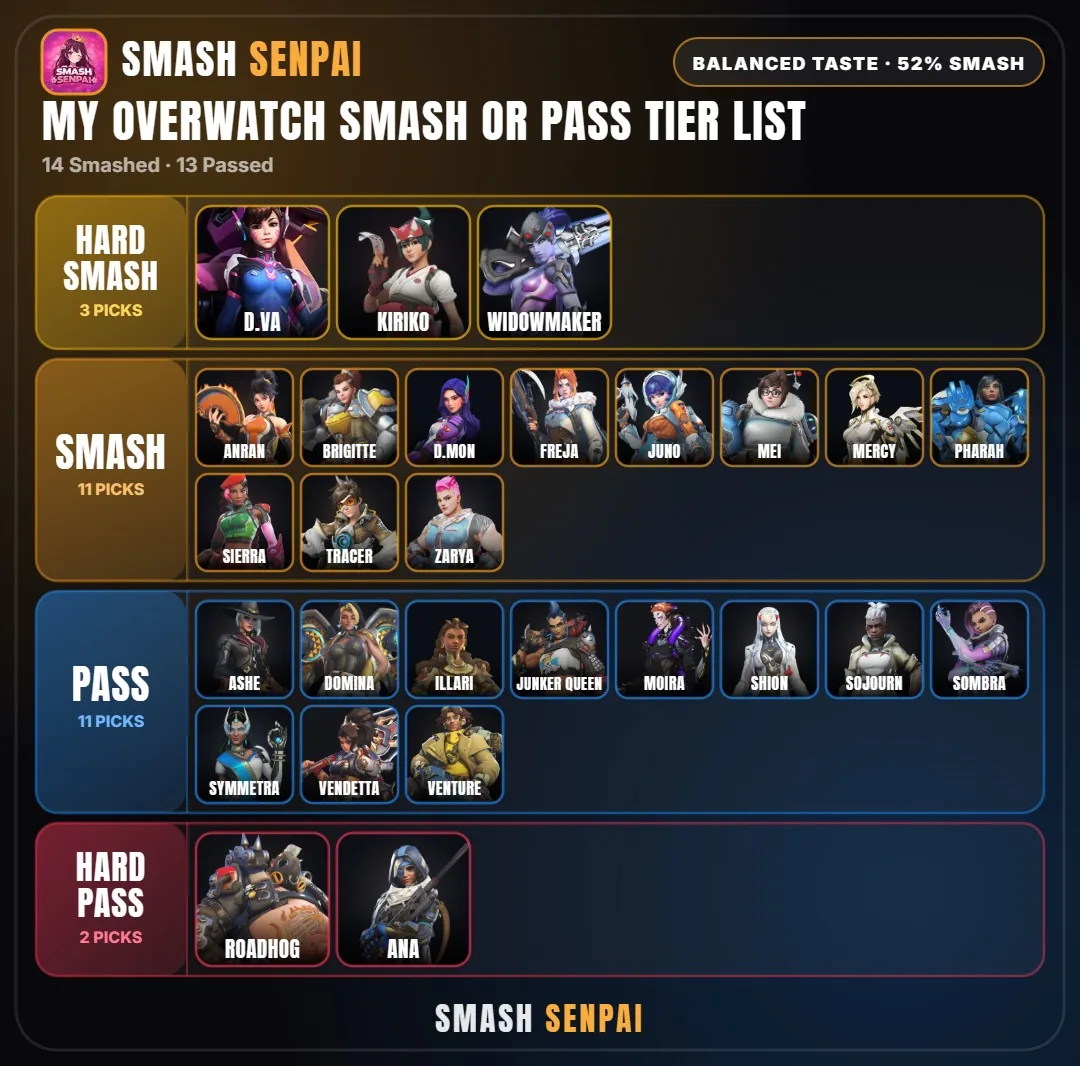
Step 1: Vote until the tier list unlocks
Pick a game from the homepage and start voting. The tier list isn't available right away, because a list built from three votes wouldn't say much. It unlocks after 20 votes in every game, and the button appears under the Smash and Pass buttons.
You don't need an account. The votes you cast while playing also count toward that game's live rankings.
Step 2: Choose your hard smashes and hard passes
When you open your tier list you can choose up to five Hard Smashes and five Hard Passes. These are the characters at the extremes, so pick the ones you would defend if a friend challenged you. Five is the starting limit, not a hard rule: you can move more characters into the hard tiers in the next step.
Step 3: Customize your tiers
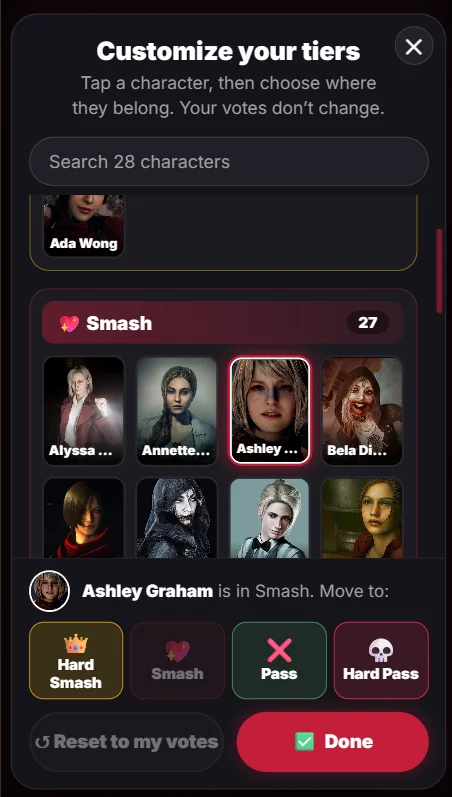
Tap Customize tiers to rearrange the list. Tap a character, then choose where they belong: Hard Smash, Smash, Pass or Hard Pass. In a big roster, the search box at the top finds a character by name so you don't have to scroll through every tier.
Reset to my votes puts every character back where your original votes placed them, and Done saves the list. The screen also says that your votes don't change, so rearranging a tier list only changes how the image looks. It doesn't touch the votes you already cast.

It works the same way on a phone, with the buttons pinned to the bottom of the screen.
Step 4: Add your name, then download or share
Once the tiers look right, add your name and save the list as one image. Because it's a single picture, you can post it in the Smash Senpai Discord, on Reddit or X, or send it to a friend in a message. Each game uses its own color scheme, so it's easy to tell at a glance which game a tier list came from.
Tips for a tier list worth sharing
- Keep the hard tiers meaningful. If half the roster is Hard Smash, the top row stops telling anyone anything.
- Compare with a friend. Post both lists side by side and argue about the biggest differences. You can also send a challenge link and see how closely your votes match.
- Read your smash rate. A rate near 50% means you split the roster almost evenly. A much higher or lower number says you're either easy to please or very picky.
- Redo it when the roster grows. New characters are added as banners and anime seasons come out, so an older list is worth refreshing.
Tier list questions
Do I need an account?
No. Every game runs in your browser with no sign-up.
Does customizing change the live rankings?
No. Moving characters around only changes your tier list image. The live rankings come from the votes you cast while playing.
Which games have tier lists?
All of them. Pick a game to start:
- Anime
- Genshin Impact
- Honkai: Star Rail
- League of Legends
- Overwatch
- Pokémon
- Resident Evil
- Valorant
- Wuthering Waves
- Zenless Zone Zero
Can I make one on my phone?
Yes. The tier list and the Customize tiers screen both work on mobile, as the screenshot above shows.
Ready to build yours? Pick a game, vote until the tier list unlocks, then see how your picks compare with everyone else's on the live leaderboards.